Claude Code session status in your tmux tab bar
tmux-claude-status-tabs is a small tool that shows the state of each Claude Code session in the tmux tab bar, so you can see from any window which session is still working, which one is waiting for you and which one is done. It’s written in Bash and jq on top of Claude Code hooks, and MIT licensed.
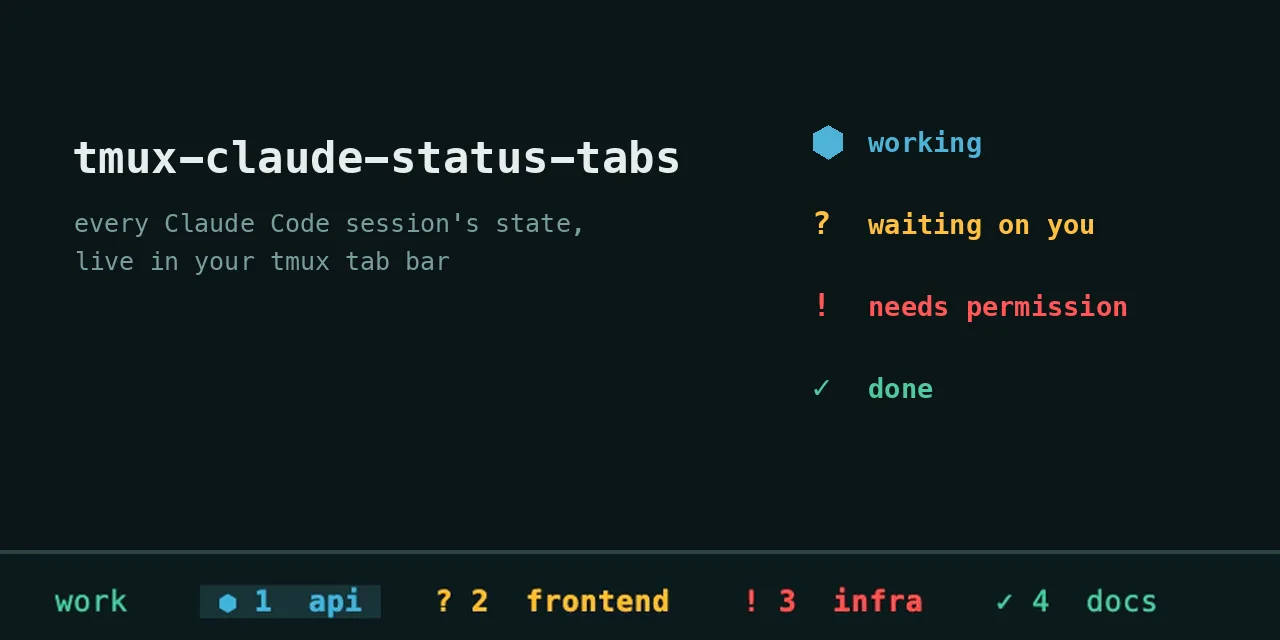
I built it to get an easy overview in my own nvim setup: which tab should I switch to next to follow up on a Claude conversation, without necessarily needing notifications for that. I ended up adding those anyway.
Every tab that runs a Claude session gets a sign in front of its name. While Claude is working that’s a spinner, when it asks you something it turns into an amber ?, when it needs permission for a command it becomes a red !, and once it’s done you get a green ✓. If you split a window between two sessions, the tab shows whichever of the two is most urgent, so a permission request in one pane doesn’t get hidden by the other one still working. Close a pane and its state goes with it.

On macOS you also get a notification when a session asks something, needs permission or finishes. Those go through osascript, so there’s nothing extra to install, but with alerter installed you can click the notification and it takes you straight to the right window. Questions and finished turns don’t notify you when that window is already the active one, permission requests always do, and since 24 August the notifications are silent banners. Other platforms skip notifications.
It started in March 2026 as claude-tmux-hooks and got renamed twice in August, the second time because farnots/tmux-claude-status already existed with the same idea and the same name.
How it works
Under the hood it’s all Claude Code hooks, which run a shell command at fixed moments in a session. The installer wires ten of those events to five small scripts:
UserPromptSubmit / PreToolUse / PostToolUse  ->  busy-window.sh       ->  running, spinner starts
PreCompact / PostCompact                     ->  busy-window.sh       ->  running
PermissionRequest                            ->  permission-window.sh ->  permission
Stop / Notification                          ->  notify.sh            ->  input or done
SessionStart                                 ->  reset-window.sh      ->  input, spinner stops
SessionEnd                                   ->  end-window.sh        ->  cleared
SubagentStop is left out on purpose, since a subagent finishing doesn’t mean the chat is finished. The list of events lives in hooks/events.txt, and a test fails as soon as that list drifts from install.sh or from the events a Claude release actually sends.
Each script writes its state onto its own pane with tmux set-option -p (@claude-pane-state) and then works out the state of the whole window, which ends up in the window option @claude-state. The status bar format only reads that option, with #{?#{==:#{@claude-state},running},...} conditionals, so the normal path doesn’t poll anything and a tab repaints within about half a second after a hook fires.
Telling a question apart from a finished turn is done by looking at the reply itself. On Stop, hooks/notify.sh reads last_assistant_message from the hook payload, and a reply that ends with a ? or with a closing Next step: line turns the tab amber, anything else turns it green. When Claude uses the AskUserQuestion or ExitPlanMode tools the tab stays amber until you’ve answered, so tool calls from subagents in the meantime can’t paint over a question you haven’t read yet.
A hook only touches a tab when TMUX_PANE points at its pane. Background and forked sessions run under the claude --bg-pty-host daemon, whose process tree never touches tmux, so their hooks are dropped instead of being guessed onto some tab.
The transitions Claude does not report
Some changes don’t fire a hook at all, and those took a good part of the work.
Pressing Esc is one of them. Nothing fires, so the spinner kept spinning over a run that had already stopped. The spinner now keeps an eye on the session transcript and hands the tab back as soon as Request interrupted by user shows up in there.
Approving a permission request is another. Claude sends no event when you approve, and PostToolUse only arrives once the command has finished, so the tab would stay red the whole time the command runs. A watcher now releases the red as soon as the command shows up under the session’s process, or when any hook fires for that pane.
Stop hooks are the third. Stop fires before the chain of stop hooks runs, and a stop hook can hand the turn straight back to Claude, so the colour after Stop is only provisional: a watcher reads the transcript and switches the tab back to running if the main thread starts writing again.
On top of that, hooks/reconcile-panes.sh checks every tab every few seconds against ~/.claude/sessions/<pid>.json, a file the Claude Code CLI keeps for each live session, with a status of busy, waiting or idle and the tmux pane it runs in. Before building it I measured an 11-hour working day, and in total the tabs showed a finished colour for 35 minutes while that file still said busy, with one stretch of 203 seconds. The hooks still paint first and decide what a state means, because a question and a finished turn are both just idle to Claude, so the verifier only corrects drift.
The verifier runs inside the loop of hooks/seed-panes.sh --watch. That seeder also gives an indicator to panes that have a live Claude session in their process tree but no state yet, and clears panes whose session has exited, but it never overrules a state a hook has set.
Install
git clone https://github.com/LiveNL/tmux-claude-status-tabs
cd tmux-claude-status-tabs
bash install.sh
You’ll need tmux 3.0 or newer, jq and the Claude Code CLI. The installer copies the hook scripts to ~/.claude/hooks/ and merges their wiring into ~/.claude/settings.json, after making a backup of the existing file and without touching your other hooks. If you’ve set CLAUDE_CONFIG_DIR it uses that instead, which realDragonium added in pull request #1.
Then add one of these to ~/.tmux.conf and reload:
# Option A: the included window format
source-file /path/to/tmux-claude-status-tabs/tmux/claude-state.conf

# Option B: keep your own theme and prepend the #{?...} fragment from
# tmux/claude-state-prefix.txt to window-status-format and
# window-status-current-format
The installer copies seed-panes.sh but doesn’t start it, so run it from tmux on a timer and on the events where a pane gains or loses a session. --watch runs a pass every 10 seconds by default, and --dry-run only reports what it would do.
Configuration
The colours are cyan, yellow, red and green in tmux/claude-state.conf, so you can swap those for the values of your own theme, and the spinner frames are the frames array in hooks/lib/state.sh. Notifications can be switched off with CAN_NOTIFY="0" in hooks/notify.sh.
For debugging, DEBUG_CLAUDE_HOOKS=1 logs every hook decision to /tmp/claude-notify.log, and touch /tmp/claude-hook-env.log makes every hook record which pane and process ancestry it was fired with. If a pane ends up linked to the wrong conversation, hooks/link-pane.sh <session-id> binds it by hand, --guess lists the conversations for that pane’s project and --clear removes the binding again.
Tests
bash tests/run-all.sh runs every suite against its own throwaway tmux server, and GitHub Actions runs them on every push, more than 300 assertions in total. Two of the suites are there because Claude Code can change underneath the hooks. test-payload-contract.sh checks the fields the hooks read against payloads Claude really sent, captured with hooks/capture-payloads.sh on and redacted to key names, and test-session-contract.sh pins the four fields the verifier reads from the undocumented session file.
Limitations
Desktop notifications only work on macOS. The verifier depends on ~/.claude/sessions/<pid>.json, which is internal to Claude Code, so if that format changes the contract test will fail, but it won’t fix anything by itself.
A conversation started without arguments can end up hosted inside Claude’s daemon, with the pane only holding a client. seed-panes.sh marks those panes as unlinked, so the tab shows that a session is there but not what it’s doing. Starting the conversation in the pane itself, the way claude --resume <id> does, avoids that.
Hooks without TMUX_PANE are dropped, so background sessions never get a tab. And the spinner gives up after four hours and clears the state, so a crashed session can’t leave a sign behind.
It’s not the first thing I put in my tmux status bar. The Spotify track and artist script did the same for music, and my tmux config is in my dotfiles.