A Hacker News iPhone widget in Scriptable, no server
hackernews-ios-widget is a single JavaScript file for Scriptable that shows the top 10 Hacker News stories in a large widget on your iPhone home screen. It talks to the official Hacker News API straight from the phone, so there’s no server or backend in between and nothing gets tracked.
I like reading Hacker News, but the widgets I found only show a few stories instead of as many as fit. So I built my own, with Claude Code. I still use it every day: a tap goes straight to the article or to the comments on Hacker News, with no extra app in between.
What the widget shows
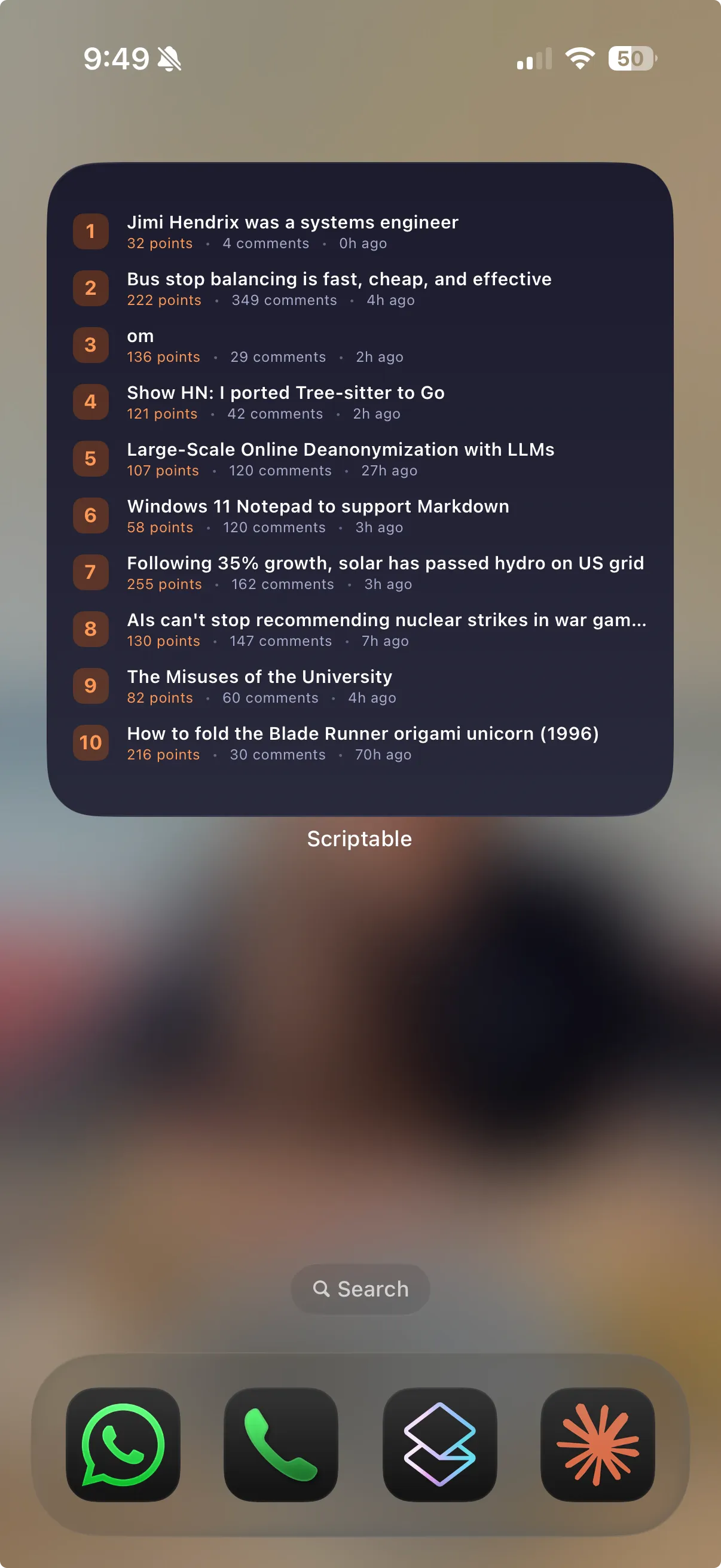
It’s a list of ten rows on a dark gradient. Every row has an orange badge with the rank on the left, the title in white next to it, cut off after one line, and below the title a line with the points in orange, the number of comments and how many hours ago the story was posted. All colours are in one CONFIG.colors object at the top of the script, so they’re easy to change.
In Scriptable you make part of a widget tappable by setting url on a stack. The first version had one URL for the whole row, which is now split in two: tapping the title opens the article, and tapping the line below it opens the comments on Hacker News. Ask HN posts and other posts without an external link have no url in the API, so for those the title goes to the comments page as well.
How it works
The script uses two endpoints of the Hacker News Firebase API, and builds a third URL for the comments page:
https://hacker-news.firebaseio.com/v0/topstories.json
https://hacker-news.firebaseio.com/v0/item/<id>.json
https://news.ycombinator.com/item?id=<id>
topstories.json returns the story IDs in ranking order. The script keeps the first ten and loads the details of those ten in parallel:
async function fetchTopStories() {
  const req = new Request(CONFIG.api.topStories)
  const ids = await req.loadJSON()
  const topIds = ids.slice(0, CONFIG.storyCount)

  const stories = await Promise.all(
    topIds.map((id) => new Request(CONFIG.api.item(id)).loadJSON())
  )
  return stories.filter((s) => s && s.title)
}
The filter at the end drops anything that came back empty or without a title. From each story the widget uses id, title, url, score, descendants (the comment count) and time, and the age is worked out on the phone in whole hours:
const hoursAgo = Math.floor((Date.now() / 1000 - story.time) / 3600)The two tap targets are two lines in addStoryRow:
titleStack.url = story.url || CONFIG.api.comments(story.id)
// ...
metaRow.url = CONFIG.api.comments(story.id)
At the end the script checks where it’s running. On the home screen (config.runsInWidget) it hands the widget to iOS with Script.setWidget, and inside the Scriptable app it shows a large preview with widget.presentLarge(). If anything throws along the way, the widget shows Error: with the message instead of the list.
The main block is wrapped in an async function that calls itself, because top-level await doesn’t work when a Scriptable loader fetches the code from GitHub and runs it through eval(). With the wrapper, await works either way.
The script doesn’t set a refresh date, so iOS decides when to run it again, which is usually somewhere between every 15 and 60 minutes. Every run fetches fresh data, nothing is cached on the phone.
Install
You need an iPhone with Scriptable, which is free.
- Install Scriptable from the App Store.
- Open Scriptable and tap + to create a new script.
- Copy the contents of
hacker-news-widget.jsand paste it into the editor. - Tap Run once. A large widget preview should appear.
- Go to the home screen, long-press, tap +, and add a Scriptable widget in the large size.
- Long-press the widget, tap Edit Widget, and set Script to the script you just created.
Customising
Most things you’d want to change are at the top of the script. storyCount (10 by default) sets how many stories are fetched and shown, and colors holds the background gradient, badge, accent, separator, meta text and divider colours.
The spacing is tuned for exactly ten rows, though. The first version showed eight stories, and going to ten took another round of tightening the widget padding, row padding and dividers before all ten fit in the large widget without being cut off. So if you raise storyCount, expect the bottom rows to disappear unless you shrink the spacing further.
There’s also a VERSION constant, set to a timestamp like "2026-02-25 09:15", which the script logs to the Scriptable console on every run:
console.log(`[HN Widget] version: ${VERSION}`)That’s for CDN caching. If you load the script from GitHub instead of pasting it in, you can still get an old cached copy after pushing a change, and bumping VERSION with every change lets the console tell you which copy is actually running.
Limits
It only does the large widget. The preview uses presentLarge() and the spacing is tuned for that size, so small and medium aren’t handled.
Ages are always in hours, which means a story from ten minutes ago shows 0h ago and one from almost three days ago shows 70h ago. Points and comments only show up when they’re not zero, so a story without comments simply has no comment count.
The ten story requests run in one Promise.all, so a single failed request shows the error instead of the other nine stories, and every refresh costs eleven requests, one for the list and one per story. The colours are fixed, so the widget looks the same in light and dark mode, and long titles get cut off with an ellipsis.
The code is in hackernews-ios-widget on GitHub.